Run your whole business without eighteen tabs open
Booking, invoicing, leads, reviews, payroll, and an AI chat assistant on your website that answers customers at 2am — Kelbra bundles the tools a small business actually needs into one dashboard, one login, one subscription.
- Contractors & trades
- Salons & spas
- Shops & counters
- Auto repair & detailing
- Cleaning
- Catering & food
- Events & car shows
- Rentals
- and more
Watch Kelbra run one job, start to finish
Two minutes of real screens, nothing mocked up. This one is a roofing job; a caterer, a cleaner or a salon gets the same tools priced for their own work.
- 1A customer asksThey book a time or ask for an estimate from your link, any hour, no account to make.
- 2Kelbra answersA reply goes out in your name and the customer is saved, before you’ve seen your phone.
- 3You quote and scheduleThe estimate becomes the job on your calendar, with the crew on it. Nothing retyped.
- 4You get paidThe invoice carries a Pay now button, or take a card at the counter. A card payment marks it paid by itself.
This is Kelbra, not a mock-up
Real screens from the running product. Only the customer names and dollar figures are examples — everything else is exactly what you get.
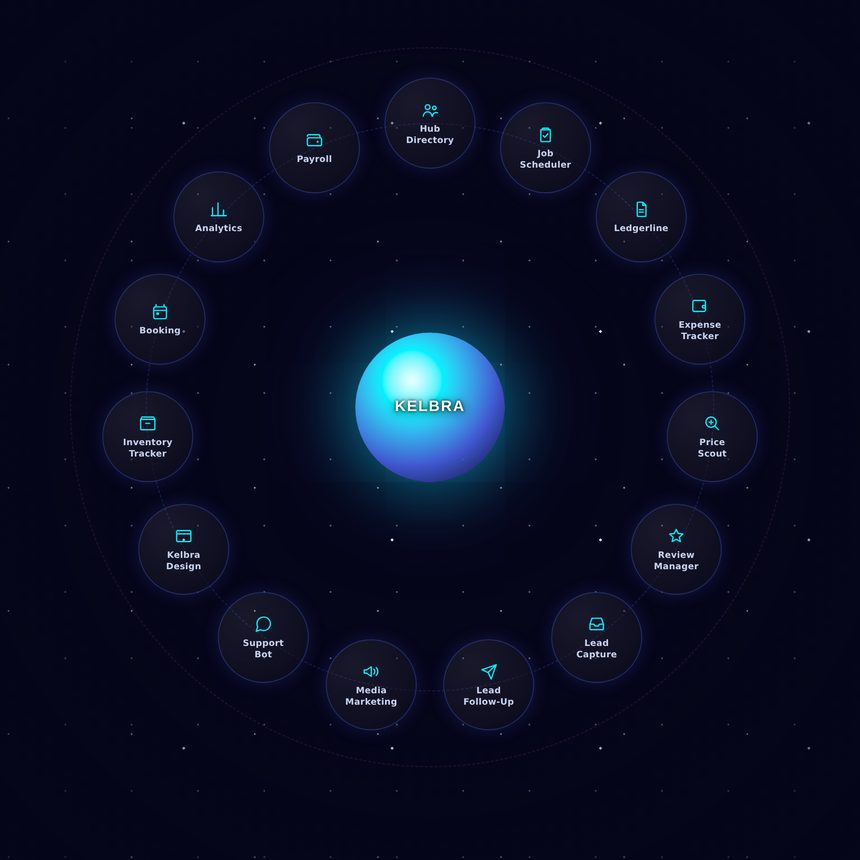
Your whole business on one screen
Show only the tools you use, drag them where you’ll remember them, and rename them to suit you. The customer who booked on Monday is already there when you invoice on Friday.
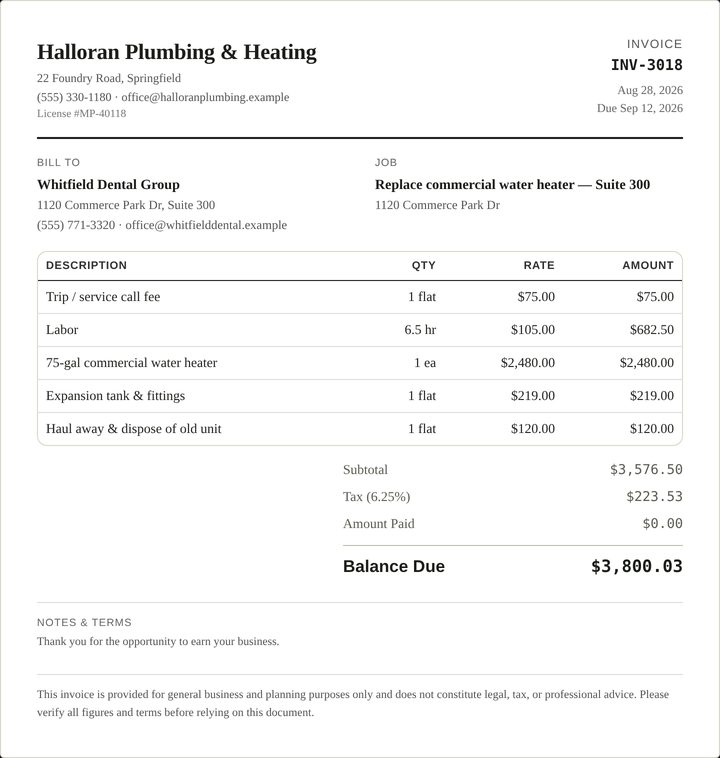
Invoices that look like a real business sent them
Estimate to quote to invoice, with your license number, your terms and the numbers already added up. Nothing to retype between the estimate and the bill.
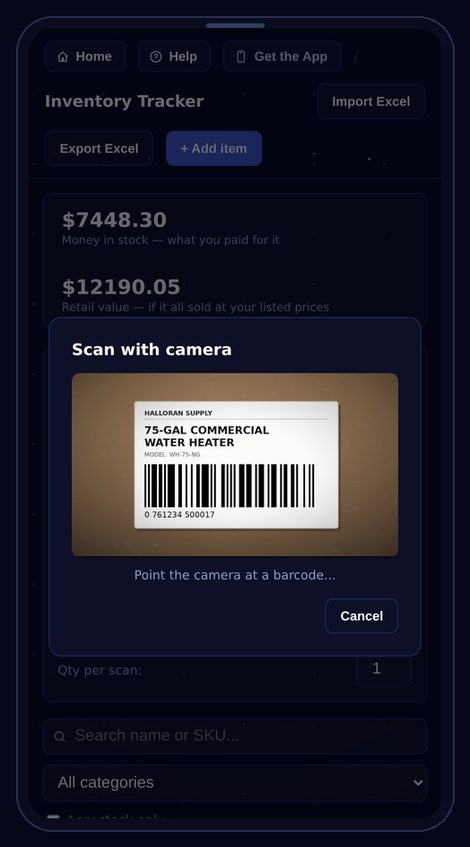
Kelbra can be used on your mobile device
Scan stock straight off the shelf with your phone camera — no extra hardware to buy. Every tool works the same on a phone as it does at the desk.
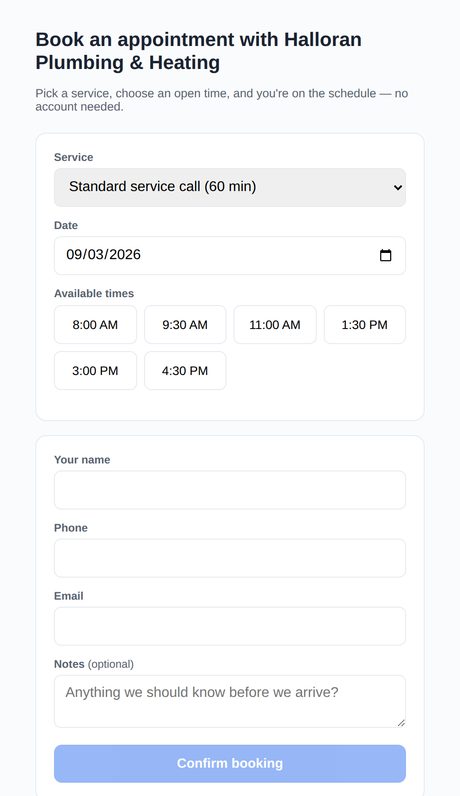
And this is what your customers see
A booking link they can use at 11pm without creating an account. Same for estimate requests — they fill it in, it lands in your leads.
Whatever you do for a living. Tick what you do on Business info and Kelbra sets itself up for it — pricing forms, estimate questions and ad layouts for twenty-five lines of work, from roofers and plumbers to caterers, cleaners, auto detailers, rental hosts, meat processors and car shows. A salon, a shop or a studio uses the same tools with its own prices — the check-in desk, packages and the counter till were built for exactly them.
You're running a business, not a tab collection
Most owners end up with a booking app, a texting app, a spreadsheet for invoices, and a sticky note for who still owes what. Kelbra replaces the pile with one dashboard that already talks to itself.
The 9pm message you can't get to
An estimate request or a booking question comes in after hours and would sit until morning — or go to whoever answered first. With Kelbra the question is answered on the spot, the request is taken, and a reply goes out in your name before you've seen it.
The quote's in a text, the invoice is in a spreadsheet
And who still owes what is in your head — nothing adds up until tax season hurts. Kelbra takes the estimate to the quote to the invoice to the payment in one place, so nothing gets retyped and nothing lives in your head.
The review you meant to reply to
A five-star review deserves a thank-you and a one-star review needs an answer fast — but writing them is the first thing that slips in a busy week. Kelbra drafts the reply for you, and, once you switch it on, asks your customers for the next review by itself after every job.
Eighteen tools, all included. Nothing extra to buy.
Every tool below is turned on the moment your trial starts — no add-ons, no per-tool pricing, no separate accounts to create.
Booking
A public booking link customers use anytime — no phone tag, no account for them to create.
Lead Dashboard
A public estimate form with an AI-drafted reply ready before you've even opened your phone.
Lead Follow-Up
Automatic follow-up emails on your own schedule, so a quote request never quietly goes cold.
Ledgerline
Estimates, quotes, invoices, and proposals that look professional and get paid faster. Pricing built for twenty-five lines of work, from roofing to catering to rentals, sent as a PDF or straight from Kelbra.
Take a payment
Ring up a sale at the counter: scan the items, take the card on a reader or the Square app, cash with the change worked out, or a QR code they pay on their own phone. A cash till with a starting float and an end-of-day count.
Packages & memberships
Sell a pack of sessions or a monthly membership that bills the card by itself, give every customer a card on their phone, and see who is running low or due to renew.
Expense Tracker
Log job costs as they happen instead of sorting a shoebox of receipts every quarter.
Payroll
Track hours and pay your team without a spreadsheet or a sticky note on the dashboard.
Analytics
Money made, money spent, and profit — in plain numbers, updated automatically.
Hub Directory
One CRM for every customer, job history, and contact — searchable in seconds. Email a customer from their card, and when they reply it lands right back on that card, with a copy in your own inbox.
Job Scheduler
See every job on the calendar and exactly who's assigned to it, at a glance.
Inventory Tracker
Barcode-scan stock from your phone — always know what's on the shelf and what to reorder.
Crew
A two-week schedule you can print for the wall, and a time clock your crew taps from a phone or a shared tablet — hours land straight in Payroll.
Check-in
A front-desk screen for a shared tablet: scan a customer's card, see what they have left, start a session on a bed or a room, and mark it clean before the next one.
Review Manager
AI drafts three replies to every review — pick one and copy it onto Google or Yelp in a click.
Ad Creator
Flyers, business cards, postcards, yard signs, door hangers, coupons and social posts on a real design canvas. Every layout comes already filled in with your name, logo, colours and a QR code to your booking page; add your own photos, shapes and AI-written text, then download print-ready PDFs or email the finished design to your customers.
Support Bot
A 24/7 chat bubble on your public pages that answers customer questions the moment they ask.
Text Reminders
Weekly, monthly, yearly or on the dates you pick — text everyone who said yes to texts, plus a birthday text, a thank-you every tenth visit, and a nudge to anyone who has not been in for a while.
Price Scout
Ask AI for vendor pricing, or snap a photo of a part to search by what it looks like.
Coming soonKelbra + Phone. Two-way texting from your own local number, a text straight back to anyone whose call you missed, and an AI receptionist that picks up the calls you can’t get to, answers the common questions and takes a message — so a phone ringing while you’re on a job isn’t a customer lost.
You'll be live before your coffee's cold
Sign up
Create your account and tell us a little about your business — takes under two minutes, no paperwork.
Let Kelbra fill it in
Type your website address or pick your Google listing, and your name, logo, phone, address and opening hours land in place. Every tool is unlocked from day one.
Go live
Share your booking and estimate links with customers — by text, by email, or straight from your existing website.
Everyone else sells you one tool. Kelbra sells you eighteen.
Quotes, invoices and scheduling on their own are $49 a month. Review requests, $75. Inventory, another $49. Kelbra is all eighteen tools, and the work moves between them instead of you retyping it.
Buying them one at a time
Four logins, four bills, four renewal dates. Nothing moves between them — you retype the customer's name into each one. And this is the cheap end: each is that company's lowest plan that does the job, and they still leave out crew scheduling, payroll records, expenses, marketing designs and more.
Regular monthly prices from each company's own pricing page, checked October 17, 2026. A tool that has a free plan able to do the same job isn't counted.
Kelbra, all in
One login. One bill. Every one of those jobs, and a dozen more, for less than those four cost — and a quote becomes an invoice becomes a job on the calendar without you typing it twice, which is the part no amount of separate subscriptions buys you.
One flat monthly subscription. Every tool included.
- All 18 tools, no per-tool add-ons
- AI features included, nothing extra to buy
- 14-day free trial — card required, nothing charged until day 15
- No contracts, manage billing yourself
Founding price. $199 a month after the first 50.
Everything in Kelbra, plus your phone answered.
- All 18 Kelbra tools
- Two-way texting from your own local number, 500 texts a month
- Missed a call? The caller gets a text right away
- An AI receptionist that answers, books and takes messages, 300 minutes a month (about 100 calls)
- No overage charges, ever. At your limit, calls simply ring through to you
The questions people actually ask
Do I need a card for the free trial?
Yes, and nothing is charged for 14 days. Cancel before day 15 and you pay nothing at all — you manage that yourself from inside Kelbra, no email or phone call required.
What happens on day 15?
The $69 monthly subscription starts. No contract, no minimum term, and you can cancel any month.
What’s Kelbra + Phone?
A second plan, coming soon: everything in Kelbra, plus two-way texting from your own local number, a text straight back to anyone whose call you missed, and an AI receptionist for the calls you can’t pick up. It’s $149 a month for founding members and $199 after that, with 500 texts and 300 answering minutes a month. There are never overage charges: at the limit, calls just ring through to you as they do now. Founding members keep their price on either plan for as long as they stay.
I already use QuickBooks. Is this a replacement?
No, and it doesn't try to be. Kelbra handles the work — quoting, booking, job costs, who owes what. Your accountant keeps the books. Export to Excel any time.
Can I get my data out?
Yes. Inventory, expenses, customers and your Ledgerline documents all export to Excel, invoices download as files you keep, and one button on Business info downloads everything in your account as spreadsheets in a single zip. It's your data.
What is the Founding 50?
The first 50 businesses to subscribe pay $69 a month and keep that price for as long as they stay subscribed — it does not go up on them, ever. Once those 50 places are gone the price for new businesses goes to $99 a month. If you are one of the 50, cancelling and coming back later means coming back at whatever the price is then, so it is worth staying.
Do I have to use all eighteen tools?
No. Most businesses live in three or four. The rest sit there costing you nothing extra until the day you need one.
Does it work on my phone?
Yes — and you can add Kelbra to your home screen so it opens like an app, with no app store involved. The barcode scanner uses your phone's own camera.